
Amrudin Ćatić
Strategy, creativity, and technology are combined to craft digital experiences that perform. Smart marketing meets creative execution, always focused on growth, problem-solving, and real impact.
How to set up your first Google Ads campaign (2025 edition)
9 easy steps to set up your first Google Ads campaign (2025 edition) – Ultimate beginner’s guide
Introduction to Google Ads in 2025
In this guide, you’ll learn how to set up your first Google Ads campaign (2025 edition) in a simple, step-by-step way. Google Ads continues to dominate the online advertising world in 2025. With billions of daily searches and powerful targeting tools, it’s still one of the best platforms to get your business in front of potential customers. Whether you’re a solopreneur, a startup founder, or running a small business, setting up your first campaign can unlock game-changing growth.
What’s new in 2025? Google Ads now offers even more automation, AI-driven insights, and improved integration with Google Analytics 5. With smarter Performance Max campaigns and enhanced audience segmentation, success is more achievable than ever if you know how to set things up right. And also with billions of daily searches and powerful targeting tools (see top SEO tools for 2025), it’s still one of the best platforms
Prerequisites before launching your campaign
Before jumping into the dashboard, there are a few things you should prepare:
Google account setup
You’ll need a Google account. If you already use Gmail or YouTube, you’re set. Simply visit ads.google.com and sign in.
Website readiness
Ensure your website is:
- Mobile-optimized
- Fast-loading
- Equipped with clear CTAs (Call to Actions)
If you’re sending traffic to a cluttered or confusing website, you’re burning money.
Setting clear goals
Are you aiming for:
- Sales?
- Leads?
- Website traffic?
- Brand awareness?
Clearly defined goals (learn how to align content with goals) will shape the structure and success of your entire campaign.
Understanding Google Ads campaign types
Before setting up your first ad, you’ll need to pick the right campaign type:
| Campaign type | Best for |
|---|---|
| Search Ads | Direct intent, leads, sales |
| Display Ads | Brand awareness, remarketing |
| Video Ads | YouTube reach, storytelling |
| Shopping Ads | E-commerce products |
| Performance Max | AI-optimized, all-in-one reach |
Each has its advantages, but Search Ads are typically best for beginners due to their straightforward nature.
Step by step: Setting up your first Google Ads campaign
Follow these easy steps on how to set up your first Google Ads campaign in 2025, even if you’re starting from scratch.
1. Choose your campaign type
Start by clicking “+ New Campaign.” You’ll be prompted to choose your goal. For most first-timers, “Website Traffic” or “Leads” via Search Ads is a great starting point.
2. Selecting campaign goals and objectives
Your chosen goal informs Google’s algorithm. Here’s a breakdown:
| Goal | What it does |
|---|---|
| Sales | Drive purchases |
| Leads | Encourage signups or inquiries |
| Website traffic | Send users to your site |
Pick the one that aligns with your business objectives.
3. Targeting the right audience
This includes:
- Geographic location: Choose where your ad will be shown.
- Language: Match your audience’s preferred language.
- Devices: Desktop, mobile, or both.
Advanced tip: Use “audience segments” to further refine who sees your ad based on behavior or interests.
4. Keyword research and selection
Keywords are the backbone of your campaign. Use Google’s Keyword Planner to:
- Find relevant search terms
- Identify monthly search volume
- Estimate competition and cost-per-click (CPC)
Start with a mix of short-tail (e.g., “running shoes”) and long-tail (e.g., “buy running shoes online USA”) keywords.
5. Writing effective ad copy
Your ad copy should:
- Include the keyword
- Highlight a unique benefit
- Feature a strong CTA (e.g., “Shop Now,” “Get a Free Quote”)
Example:
Headline: Affordable SEO services near you
Description: Boost your rankings and get more traffic. Call now for a free consultation!
6. Setting your budget and bidding strategy
You’ll decide between:
- Daily budget: Amount you’re willing to spend each day.
- Bidding strategy: Choose manual or automated bidding.
I prefer to be manual, because in that case I have full control over what I am doing.
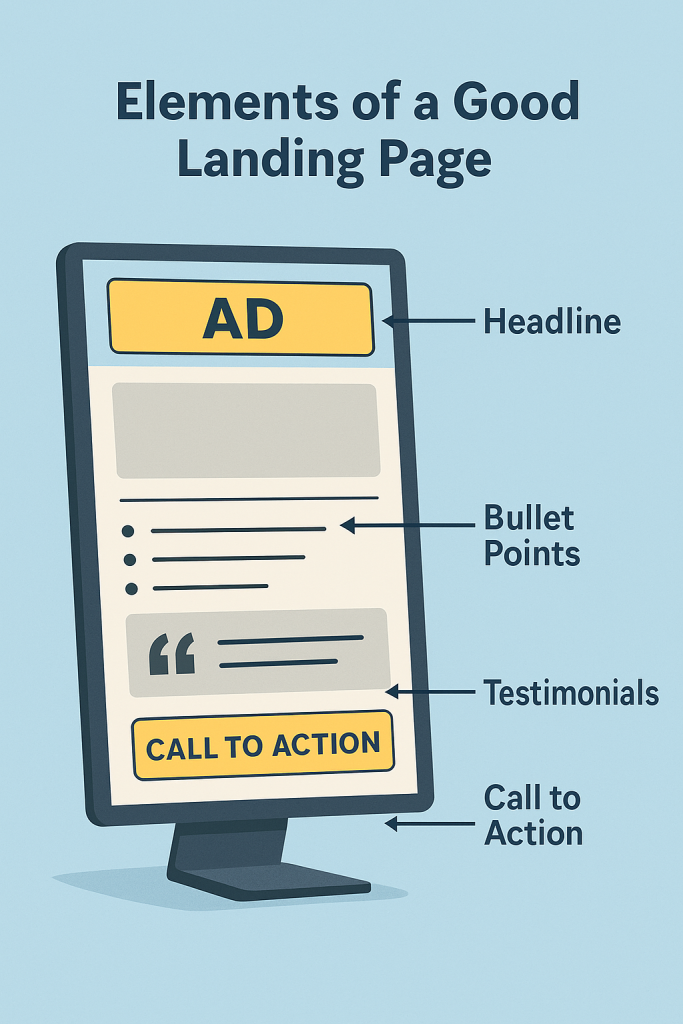
Crafting a high-converting landing page
The ad gets them to your site, but the landing page seals the deal. Make sure it includes:
- A clear headline
- Benefits listed in bullets
- Testimonials or trust badges
- One focused CTA
Also, test your page on mobile and improve speed using tools like PageSpeed Insights.
Setting up conversion tracking
Conversion tracking shows whether your ads are working.
Steps:
- Install Google Tag Manager
- Set up Google Ads Conversion Tag
- Connect to Google Analytics 5 (GA4)
This lets you track form submissions, purchases, and more.
Using ad extensions to maximize clicks
Ad extensions increase your ad’s size and relevance. Must-use types include:
- Sitelink extensions: Link to other important pages
- Callout extensions: Add short phrases like “Free Shipping”
- Structured snippets: Highlight product/service types
These can boost your CTR significantly, often by 10–15%.
Monitoring and optimizing campaign performance
Once live, don’t “set and forget.”
Key metrics to monitor:
- CTR (Click-through rate)
- CPC (Cost per click)
- Conversions
Use the data to:
- Pause underperforming keywords
- Adjust ad copy
- Shift budget to high-performing areas
Common mistakes to avoid in 2025
- Too broad targeting: Wastes budget fast.
- No conversion tracking: You won’t know what’s working.
- Ignoring mobile: Mobile-first design is essential.
- Skipping negative keywords: These prevent irrelevant clicks.
Recommended tools for managing Google Ads
Here are tools that can save you time and improve performance:
| Tool | Use Case |
|---|---|
| SEMrush | Competitor keyword insights |
| SpyFu | Discover competitors’ ad strategies |
| AdEspresso | Visual A/B testing for ads |
FAQs about setting up Google Ads campaigns in 2025
Q1: Is Google Ads free to use?
A: You can create an account for free, but you pay for ad clicks or impressions.
Q2: How much should I spend on my first campaign?
A: Start small, around $20–$30/day, and scale once you see results.
Q3: How long before I see results?
A: Campaigns can start showing traction within days, but optimization takes weeks.
Q4: What’s a good CTR for beginners?
A: A CTR of 2–5% is solid. Anything above that is excellent.
Q5: Should I hire an agency or go DIY?
A: For small budgets, DIY works. Just ensure you keep learning and optimizing.
Q6: What happens if I pause my campaign?
A: Your ads stop running, but your data remains intact for future use.
Conclusion
Launching your first Google Ads campaign in 2025 doesn’t have to be overwhelming. By understanding the basics, leveraging the latest tools, and staying data-driven, you’ll set yourself up for a successful advertising journey. Google Ads remains one of the most powerful ways to get targeted traffic, and with this guide, you’re more than ready to take the first step.