
Amrudin Ćatić
Strategy, creativity, and technology are combined to craft digital experiences that perform. Smart marketing meets creative execution, always focused on growth, problem-solving, and real impact.
How to build a client CRM without code: My No-Code stack
That’s where no-code tools come into play. With a no-code CRM, you can build a custom solution tailored to your exact needs, without writing a single line of code. In this article, I’ll walk you through how to build a client CRM without code: my no-code stack, including the tools I use, a step-by-step setup guide, and pro tips to avoid common pitfalls. Defining your CRM needs is the first step if you want to build a client CRM without code that actually works for your workflow.
Introduction: Why build a CRM without code?
Customer relationships are at the heart of any successful business. Whether you’re a freelancer, a startup, or a growing agency, managing client interactions effectively can make or break your success. But traditional CRMs often come with high subscription costs, unnecessary features, and a steep learning curve.
Understanding No-Code CRM solutions
What is No-Code development?
No-code development is the practice of building software solutions using drag-and-drop interfaces, prebuilt integrations, and visual workflows instead of traditional programming. Tools like Airtable, Notion, and Softr make it easy for non-technical professionals to create fully functional applications.
Why businesses need a custom CRM
Most off-the-shelf CRMs like Salesforce or HubSpot are powerful but overly complex for small teams. A custom-built no-code CRM allows you to design only the features you need, such as lead tracking, task management, automated emails, and client dashboards, without clutter or bloat.
Benefits of building a No-Code CRM
Cost savings and scalability
No-code CRMs are far cheaper than traditional SaaS CRMs. You only pay for the tools you actually use, and you can scale features as your business grows.
Flexibility and rapid iteration
Need to add a new client field or change your sales pipeline? With a no-code CRM, changes take minutes instead of weeks.
Integration with existing tools
Using tools like Zapier or Make, your CRM can integrate with Slack, Gmail, Stripe, and thousands of other apps, ensuring seamless client workflows.
Choosing the right No-Code stack
Key features to look for in No-Code tools
- Database flexibility (e.g., Airtable for structured client data).
- Automation capabilities (Zapier, Make).
- UI/UX customization (Softr for client-facing portals).
- Collaboration features (Notion for teamwork).
Comparing popular No-Code platforms
- Airtable → Best for data storage.
- Notion → Knowledge management.
- Softr → Building client-facing dashboards.
- Bubble → For complex apps.
- Glide → For mobile CRM apps.
Step-by-Step guide: How to build a client CRM without code
Step 1: Defining your CRM needs
Ask yourself: Do you need lead tracking, project timelines, invoicing, or client notes? Make a list of “must-have” vs. “nice-to-have” features.
Step 2: Selecting the core No-Code database tool
Airtable is my go-to choice, it functions like a spreadsheet on steroids, letting you build relational databases effortlessly.
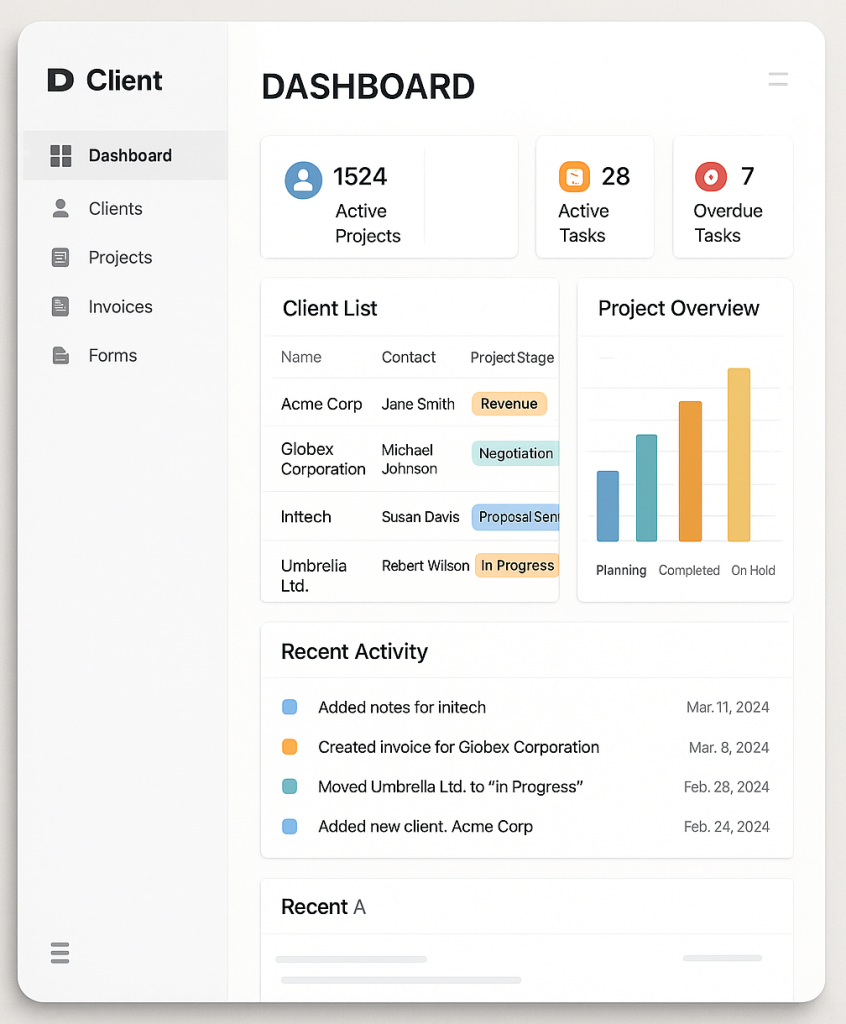
Step 3: Creating client records and data structure
Set up fields such as:
- Client name
- Contact info
- Project stage
- Last communication date
- Notes & attachments
Step 4: Designing user-friendly dashboards
With Softr, you can turn Airtable data into a sleek client portal where clients can log in and view project status, invoices, or deliverables.
Step 5: Automating workflows with No-Code integrations
- Automatically create tasks in Trello when a new client signs.
- Send Slack notifications when deals move stages.
- Trigger Gmail follow-ups using Zapier.
Step 6: Adding forms for easy data collection
Use Typeform or Google Forms to collect client intake data and feed it directly into Airtable.
Step 7: Testing and iterating your CRM
Run test cases, onboard a few clients, and refine as needed.
My recommended No-Code CRM stack
- Airtable → CRM database foundation.
- Softr → Client portal for front-end access.
- Zapier / Make → Automations and integrations.
- Notion → Team collaboration, meeting notes.
- Google Workspace → Emails, calendar syncing.
Advanced customizations for No-Code CRMs
- Dashboards with Retool or Noloco for more control.
- AI-powered features like ChatGPT for automated responses.
- Scaling beyond MVP by adding API connectors when needed.
Common mistakes to avoid in No-Code CRM building
- Overcomplicating the stack with too many tools.
- Ignoring data security (use strong access permissions).
- Skipping documentation, making future scaling harder.
Real-life examples of building a client CRM without code
- Freelancer CRM → Airtable + Notion + Zapier.
- Agency CRM → Airtable + Softr + Slack.
- Startup CRM → Airtable + Retool + Google Workspace.
FAQs on building a No-Code CRM
Q1: Can a no-code CRM handle thousands of clients?
Yes, Airtable and Softr can scale to thousands of records, though larger enterprises may eventually need custom code.
Q2: Is it secure to build a CRM with no-code tools?
Yes, most leading no-code platforms offer enterprise-grade security, but always configure access permissions carefully.
Q3: How much does it cost to build a no-code CRM?
Expect $20–$100/month depending on your chosen stack.
Q4: Can I migrate from a no-code CRM to a coded one later?
Absolutely. Data stored in Airtable or Notion can be exported and migrated to a custom-coded system.
Q5: Do I need technical skills for this?
Basic logic and workflow understanding are enough. You don’t need coding skills.
Q6: Which industries benefit most from no-code CRMs?
Freelancers, creative agencies, small startups, and consultants benefit the most.
Conclusion: The future of building a client CRM without code
Building a CRM without code isn’t just possible, it’s smarter, faster, and more cost-efficient than relying on traditional solutions. With tools like Airtable, Softr, and Zapier, you can build a fully functional, scalable CRM tailored to your unique workflow.
If you’re ready to take control of your client management, start small, iterate often, and leverage the growing ecosystem of no-code tools. The future of CRM is flexible, affordable, and code-free. If you’re ready to build a client CRM without code, start with simple tools and grow from there.
Learn more about no-code development at Nocode.tech.